Interior Design Planner 2026
If you’ve ever sketched a layout on a napkin, jotted fabric swatch ideas in a notebook margin, or lost track of a client’s preferred finish after three email threads—you’ll appreciate how the Interior Design Planner 2026 brings clarity to creative chaos. It’s not just another notebook. It’s a purpose-built, 121-page physical workbook designed for real-world interior design work—whether you’re drafting a full home renovation for a client, styling a rental apartment on a budget, or learning design fundamentals in school.
A Workbook That Grows With Your Process
Unlike generic planners or digital apps that force rigid templates, this planner meets you where you are. Its large 8.5 × 11-inch no-bleed format gives you generous space to sketch floor plans by hand, paste fabric samples, layer mood board cutouts, or write out detailed notes without crowding. The structure is intentional—not overwhelming. Each section flows logically from discovery to delivery: start with client goals, move into visual inspiration, translate ideas into room layouts, then refine selections, costs, and timelines—all in one place.
Real Tasks, Real Pages
Think about what actually happens when you begin a project:
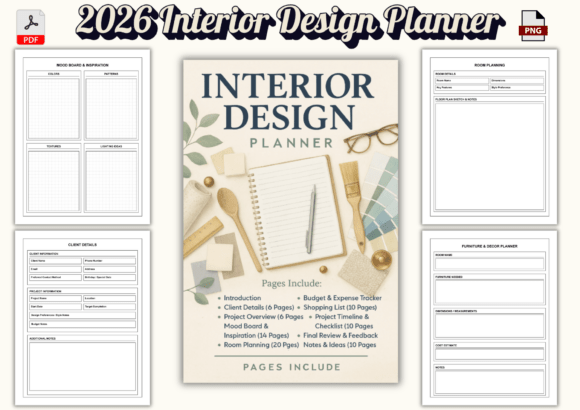
- You gather names, contact details, lifestyle needs, and non-negotiables—6 dedicated Client Details pages keep that foundational info accessible, not buried in your phone notes.
- You define scope, deadlines, and expectations—6 Project Overview pages help you clarify before the first meeting ends.
- You collect colors, textures, lighting moods, and style references—14 Mood Board Inspiration pages offer clean, uncluttered space to arrange visuals (or describe them thoughtfully if you’re sketching or writing).
- You map furniture flow, traffic paths, and scale—20 Room Planning pages include grids, blank layouts, and annotated templates—no need to redraw walls every time.
Then comes execution: choosing sofas, rugs, lighting, and decor across 16 Furniture & Decor Planner pages; tracking actual expenses against estimates on 12 Budget Expense Tracker pages; building realistic shopping lists with categories and priorities on 10 Shopping List pages; and anchoring everything to time with a 10-page Project Timeline Checklist that breaks phases into manageable steps—not just “design phase,” but “select flooring samples,” “confirm paint sheen,” “schedule vendor walkthrough.”
Why Physical Still Matters
Digital tools are great for sharing renders or sending invoices—but they don’t replace the tactile confidence of flipping back to last week’s fabric notes while standing in a showroom. The Interior Design Planner 2026 supports deep focus: no notifications, no battery anxiety, no syncing errors. Students use it to annotate textbook concepts beside their own sketches. Freelancers carry it to client homes and fill in measurements on-site. DIYers mark off tasks as they hang artwork or install shelving—building momentum through visible progress.
It’s Built for Multiple Roles—Not Just One Title
You don’t need a business license to benefit from this planner. A college student can use the Dotted Pages for quick concept thumbnails or color theory experiments. A blogger documenting a room refresh might repurpose the Final Review Feedback section to record before/after reflections or reader comments. A small studio owner could duplicate the Client Details spread for each new inquiry—and keep all files physically filed, consistent, and professional.
Even if you mostly work digitally, the planner serves as your “source of truth.” Import photos into your tablet app? Jot down key takeaways here first. Use CAD software? Sketch rough proportions on the Room Planning grids before modeling. It complements—not competes with—your existing toolkit.
Thoughtful Design, Not Just Pretty Pages
Every page earns its place. The Notes & Ideas section isn’t filler—it’s spaced generously so you can capture spontaneous insights mid-conversation. The Budget Expense Tracker includes columns for vendor name, quote date, deposit status, and follow-up reminders—not just dollar amounts. The Timeline Checklist separates prep, selection, ordering, installation, and review phases, helping you spot bottlenecks early.
And because real life isn’t perfectly linear, the planner includes 10 flexible Dotted Pages—ideal for brainstorming, client presentation drafts, or adapting to a project that shifts direction. No wasted space. No pressure to “fill it all.” Just quiet, supportive structure.
What to Keep in Mind Before You Begin
This planner shines when used actively—not stored on a shelf. If you’re new to planning workflows, start small: pick one upcoming project and try just three sections—Client Details, Mood Board, and Timeline. See how much faster decisions feel when options are visually organized.
Also consider your workflow rhythm. If you rely heavily on voice memos or photo archives, pair the planner with those habits—use it to summarize, not replace. And remember: it’s designed for 2026, but its structure works anytime. You can start mid-year, use it for a single big project, or refill it annually like a trusted journal.
Finally, while it’s spacious and professional, it’s not meant to replace contracts, insurance, or formal proposals. Think of it as your creative command center—the place where vision becomes actionable, and confidence grows with every completed page.
Your Next Step Is Simple
Whether you’re pricing your first freelance package, prepping for a design certification exam, or finally tackling your own kitchen remodel—the Interior Design Planner 2026 helps you move forward with less guesswork and more grounded intention. It doesn’t promise perfection. It offers preparation. And in interior design, where details shape experience, that’s where meaningful work begins.