Python Workbook: Learn Coding Step by Step
If you've ever opened a Python tutorial, scrolled past lines of code, and thought, “Where do I even start?”—you’re not alone. The Python Workbook was built for exactly that moment. It’s not another dense textbook or overwhelming online course. It’s a thoughtfully paced, 8.5 x 11-inch guided journey—designed to turn uncertainty into confidence, one small win at a time.
What Is the Python Workbook—Really?
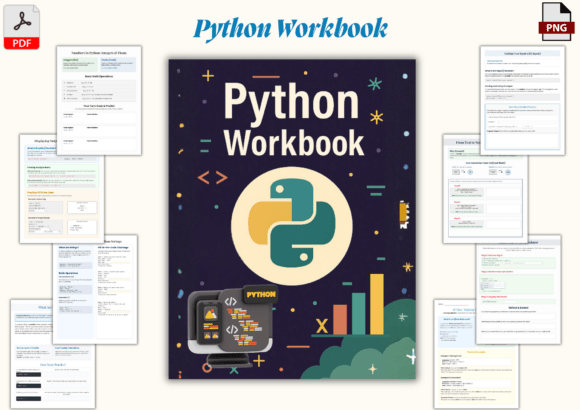
At its core, the Python Workbook is a hands-on learning companion—not a passive reader. Think of it like a coding lab in print (and digital) form: every page invites you to write, predict, test, and reflect. There are no walls of theory before practice. Instead, you’ll see a clear explanation, a visual flowchart or diagram, a short code snippet, and then space to type it yourself—or sketch what you think will happen next.
For example, early lessons introduce variables using everyday analogies (“a variable is like a labeled box where you store something”), followed by an exercise asking you to rename a variable in a real snippet—and then predict how that changes the output. That “predict then run” habit builds intuition faster than memorization ever could.
Who Benefits Most—and Why?
This workbook meets learners where they are—whether you're a small business owner automating spreadsheet tasks, a teacher preparing a week of coding activities, a parent guiding a curious teen, or someone retraining for a tech-adjacent role. Its strength lies in accessibility without oversimplification.
- Educators appreciate the clean, classroom-ready layouts—no extra prep needed. Each lesson fits neatly into a 45-minute block, with built-in debugging prompts that spark discussion.
- Homeschool families use it as a self-paced spine for a semester-long programming unit—especially because concepts spiral gently (loops appear in context, then reappear with new complexity).
- Adult beginners often tell us the “real-world examples in plain English” made the difference—like using Python to tally survey responses or sort a list of local farmers’ market vendors.
How It Fits Into Real Life—Not Just Theory
You won’t find abstract math puzzles here. Instead, the Python Workbook grounds each idea in tangible, low-stakes scenarios. One lesson walks you through building a simple grade calculator—input scores, compute averages, assign letter grades. Another helps you generate custom greeting messages for a birthday email list. These aren’t just exercises; they’re micro-skills you can adapt tomorrow.
Even the “debugging exercises” mirror actual beginner stumbles: mismatched quotes, forgotten colons, indentation errors. Rather than treating them as failures, the workbook frames them as normal—and solvable—with visual cues and gentle prompts (“Check line 7: is that colon in the right place?”).
Why the 8.5 x 11-Inch Format Matters
That specific size isn’t arbitrary. It gives you room to write code by hand (great for reinforcing syntax), sketch logic flows, and annotate freely—without flipping pages or squinting at cramped text. The high-resolution PDF and PNG files mean it prints cleanly on any home or school printer, and the modern, uncluttered design reduces cognitive load. No distracting clip art. No competing fonts. Just calm focus on one idea at a time.
Practical Tips Before You Begin
If you’re considering the Python Workbook, keep these realistic notes in mind:
- You don’t need prior coding experience—but you do need access to a computer with Python installed (or a free online editor like Replit). The workbook doesn’t include software—it assumes you’ll run your code somewhere. A quick 5-minute setup guide is all it takes.
- Work at your own pace. Some users finish a lesson in 20 minutes; others revisit the same page over two days. That’s expected—and encouraged. The “predict the output” sections are especially valuable when revisited after a break.
- It’s meant to be used actively, not read passively. Keep a notebook beside it. Try rewriting examples with different values. Change a loop to count backward instead of forward. Curiosity is built in—not added on.
- It pairs well with other tools, but doesn’t require them. Use it alongside a video walkthrough, a study group, or solo. Many freelancers and content creators use it during “learning sprints”—30 focused minutes before starting client work.
More Than Just Syntax—It Builds Coding Habits
What sets this workbook apart isn’t just what it teaches—but how it shapes your approach. Flowcharts help you plan before typing. Logic-building tasks train you to break big problems into small steps—a skill that transfers directly to project management, budgeting, or even meal planning. Even non-programmers report improved clarity in how they structure daily tasks after working through the early chapters.
And because it avoids jargon unless clearly defined (e.g., “function = a reusable set of instructions, like a recipe”), there’s no gatekeeping. You’re not learning to sound like a developer—you’re learning to think like one, in ways that serve your goals, whatever they are.
A Tool That Grows With You
Beginners start with printing messages and storing data. By the end, they’re writing programs that read text files, handle user input, and make decisions based on conditions—all while still using plain-language explanations and consistent visual support. There’s no sudden jump into frameworks or advanced libraries. Instead, the foundation gets deeper, not wider.
One educator shared how her students used the final projects to build tools for their school newspaper—automating article word counts and generating contributor lists. Another adult learner automated his freelance invoice reminders using concepts introduced in Chapter 6. These aren’t edge cases. They’re natural extensions of the workbook’s emphasis on relevance and readiness.
The Python Workbook doesn’t promise overnight expertise. It promises something more sustainable: steady progress, visible improvement, and the quiet confidence that comes from knowing—not hoping—that you can solve the next problem.