Graph Sketch Design Book Canva KDP
If you’ve ever struggled to sketch a clean layout, plot coordinates without misalignment, or plan a creative project with consistent spacing—this is the tool that quietly solves it. The Graph Sketch Design Book Canva KDP isn’t just another notebook. It’s a precision-ready, adaptable grid system built for real work: technical, artistic, and everything in between.
What Makes This Graph Sketch Design Book Different?
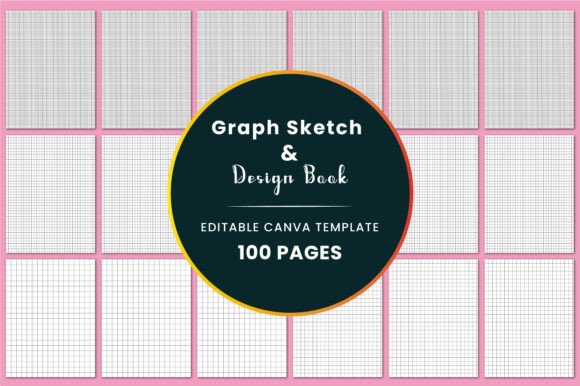
At its core, it’s an 8.5×11-inch printable and digital graph notebook—but what sets it apart is flexibility backed by intention. Each page features crisp, evenly spaced grid lines in four practical sizes: 0.5”, 0.375”, 0.25”, and 0.125”. That means you can choose fine detail for circuit diagrams or architectural thumbnails—or wider spacing for quick wireframes, mood boards, or bullet journal spreads.
All files are delivered at 300 DPI in CMYK color mode (ideal for professional printing), with no bleed—so your grids stay sharp right to the edge of the page, whether you’re printing at home or through a KDP partner. And because it comes with a Canva editable link, you’re not locked into static pages. You can customize headers, add your logo, adjust margins, or even rebrand entire sections for client-facing deliverables.
Who Uses This—and Why It Fits Real Life
Students use it to visualize algebraic functions, draft geometry proofs, or map out lab experiment setups—no more crooked axes or inconsistent scale. Designers rely on it for rapid UI wireframing, icon spacing tests, or responsive grid planning before opening Figma. Engineers sketch schematics, annotate blueprints, or track iterations—all while keeping proportions accurate.
But it’s just as valuable for non-technical uses. A small business owner might use the 0.25” grid to lay out social media content calendars, align product mockups, or plan booth layouts for craft fairs. Educators print pages to create custom worksheets—graphing temperature trends, mapping story arcs, or designing classroom seating charts. Even hobbyists find it useful: cross-stitch pattern testers, miniature painters mapping terrain, or bullet journalers building modular habit trackers.
Real-World Examples You’ll Recognize
- A freelance illustrator imports the 0.125” grid PNG into Procreate, uses it as a non-printing layer, and sketches character proportions with pixel-perfect symmetry.
- A high school math teacher downloads the PDF, adds student names and due dates in Canva, then prints 30 copies of a coordinate-plane worksheet—ready for Monday’s lesson.
- A DIY furniture maker uses the 0.5” grid to draft full-size cut plans on butcher paper—scaling measurements directly from the notebook’s reliable spacing.
- A content creator builds a branded editorial calendar in Canva using the editable template—then exports as a JPG to share in a private Slack channel with their team.
Why Digital + Printable Is a Game-Changer
Unlike physical notebooks you buy once and use until they’re full, the Graph Sketch Design Book Canva KDP gives you ongoing control. Need a version with dotted margins? Add them in Canva. Want to insert a company watermark or change the font on your title page? Done in seconds. Prefer working digitally but also like the tactile feel of pen-on-paper? Print only the pages you need—no wasted stock, no cluttered shelves.
The inclusion of JPG and PNG files also opens up options beyond printing: paste grids into Notion as background templates, drop them into PowerPoint slides for live diagramming, or use them as overlays in video tutorials. It’s designed to move fluidly between analog focus and digital efficiency.
Things to Keep in Mind Before You Start
First—check your printer settings. Since files are CMYK and no-bleed, select “actual size” (not “fit to page”) to preserve grid accuracy. If you’re uploading to KDP, confirm your cover file matches the interior dimensions and spine width calculator exactly.
Second, consider your workflow. If you rarely edit documents or prefer handwriting exclusively, the Canva link may be less essential—but still handy for occasional tweaks like adding a date stamp or changing a header. If you collaborate often, the editable format becomes a real time-saver.
Third, remember that grid size choice matters more than you might think. Try starting with the 0.25” version—it’s the most versatile for mixed-use scenarios. Reserve 0.125” for high-detail work (like pixel art or micro-sketches) and 0.5” for big-picture planning (like event timelines or room layouts).
More Than Just Lines on a Page
What makes this resource quietly powerful is how it supports clarity—not just in output, but in thinking. A clean grid reduces visual noise. Consistent spacing builds muscle memory. Knowing your sketch will align—without constant measuring—frees mental energy for creativity and problem-solving.
It’s not about perfection. It’s about removing friction so your ideas land with confidence—whether you’re calculating load-bearing specs, storyboarding a short film, or planning your first garden layout.
If you value tools that grow with your needs—and appreciate when design serves function without shouting for attention—the Graph Sketch Design Book Canva KDP earns its place on your desk, in your cloud folder, and in your daily process. And if you find it helpful, following the creator’s profile is a simple way to stay updated on new grid variations, seasonal templates, or companion resources tailored to evolving workflows.